Presenting Cybersecurity Threats with Professional Infographics
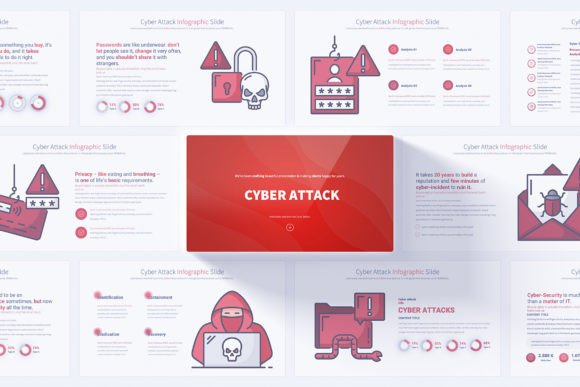
In the landscape of digital communication, clarity is power. When conveying complex topics like cyber threats, data breaches, and security protocols, visual storytelling becomes essential. A professional Cyber Attack Keynote Infographics slides template transforms dense, technical information into an accessible and engaging narrative. This isn't merely a collection of slides; it's a structured visual toolkit designed to make your cybersecurity presentations not only understood but remembered.
The Core Strength of a Designed Template
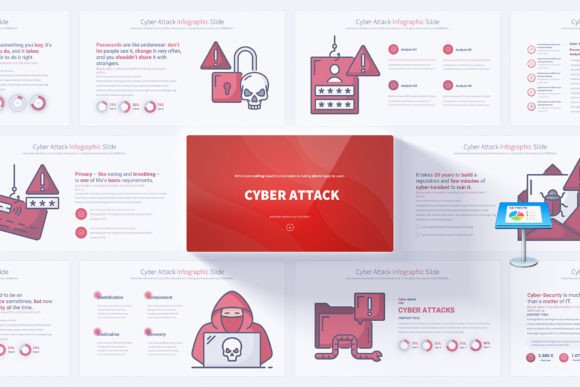
What makes a dedicated infographic template invaluable is its foundation in design principles applied to a specific domain. The Cyber Attack Keynote Infographics template offers 17 unique slide concepts, expanded to 204 total slides through master slides and color variations. This depth provides a reservoir of visual options. Instead of starting from a blank canvas, you begin with professionally crafted frameworks—flowcharts for attack vectors, comparative graphs for security solutions, timeline slides for incident response, and icon-driven slides for explaining core concepts. The handmade cybersecurity infographics are particularly crucial, as they translate abstract ideas like malware propagation or firewall functionality into intuitive visual metaphors.
This resource is built for efficiency and impact. The master slide system ensures global changes to fonts, colors, and logo placement can be applied instantly across the entire presentation, maintaining visual consistency. With 12 color variations on a clean, light background, you can adapt the mood to your corporate branding or presentation context without altering the core infographic structures. The inclusion of 280 fully editable vector icons further extends your creative vocabulary, allowing you to pinpoint specific technologies or threats with precise symbolism.
Creative Applications Across Professional Roles
The utility of this template extends far beyond a single type of presentation. Its flexibility supports a wide spectrum of users, each with distinct goals and audiences.
For Corporate Leaders and Security Teams
Internal training and stakeholder briefings require a balance of authority and clarity. Here, the template’s animated elements and smooth transitions can be used to dynamically demonstrate the step-by-step process of a phishing attack or the layered defense of a security architecture. A corporate CISO might use the comparative infographics slides to present risk assessment findings to the board, using the visual weight of charts to underscore critical vulnerabilities. The professional opening and closing slides provide a polished frame, setting the tone for a serious business discussion.
For Consultants and Educators
Consultants selling security services and educators teaching IT courses need to simplify complexity without losing accuracy. The easily editable elements allow them to tailor examples to a client’s specific industry or a class’s curriculum. An educator could use the timeline slides to walk students through the history of significant cyber attacks, making the lesson chronological and visual. A consultant might adapt the infographic slides on data protection strategies to mirror a potential client’s existing infrastructure, creating a direct and relatable proposal. The PDF documentation aids in quickly understanding the template’s structure, maximizing time spent on content rather than software mechanics.
For Investors and Freelancers
Investors evaluating cybersecurity startups need to grasp technological advantages quickly. A founder can use the template’s icon-driven slides to visually differentiate their product’s features from competitors. Freelancers, such as content creators or freelance trainers, benefit from the professional quality it offers without needing a graphic designer. They can produce client-ready presentations on topics like "Cybersecurity for Small Businesses" efficiently, leveraging the 16:9 Full HD resolution for crisp displays in webinars or recorded videos.
Adapting the Template for Different Contexts
A powerful template is a starting point, not a rigid script. The key to originality lies in how you adapt its components.
Consider your audience’s technical level. For a non-technical group, focus on the infographics that explain consequences—like the financial impact of a breach or the steps of personal data protection. Use the clean background and spacious layouts to avoid visual clutter. For a technical audience, you might delve deeper into the attack vector slides, editing the placeholder text and data points to include recent, real-world case studies.
The platform also influences adaptation. For a live conference presentation, lean on the animated transitions to build narrative flow. For a static report or PDF handout derived from the slides, you might select the most impactful individual infographics, ensuring each slide is a self-contained visual statement. The bonus vector icons can be extracted and used in other materials, like blog posts or social media visuals, creating a cohesive cross-platform campaign about cybersecurity awareness.
Maintaining Effectiveness and Originality
While the template provides the structure, your content provides the substance. To keep results clear and audience-friendly, follow a few practical guidelines. First, use the color variations consistently; choose one palette and stick with it throughout to establish visual coherence. Second, edit text aggressively. Replace generic template headlines with your specific, action-driven titles. "Common Threats" becomes "2024's Top Three Ransomware Tactics Targeting Retail."
Third, sequence your slides with purpose. Use the opening slides to establish the stakes, the infographic core slides to explain the mechanics, and the closing slides to call for action or summarize key takeaways. The template’s organization aids this, but your narrative logic completes it. Finally, infuse originality by integrating your own data, company logos, or even brief video clips into the editable slide frames. The template is a skeleton; your expertise and specific message are the flesh and blood that make the presentation uniquely valuable.
A Resource for Impactful Communication
Ultimately, the Cyber Attack Keynote Infographics template is more than a design asset. It is a catalyst for effective communication in a field where misunderstanding carries high risk. It empowers professionals to move from explaining to illustrating, from listing facts to building a compelling visual case. Whether your goal is to train, persuade, inform, or sell, this toolkit provides the visual foundation to do so with confidence and clarity. By marrying your deep knowledge with its designed framework, you create presentations that not only look professional but fundamentally enhance how your audience perceives, understands, and acts upon critical cybersecurity information.