Crafting Digital Presentations with Keynote Infographics
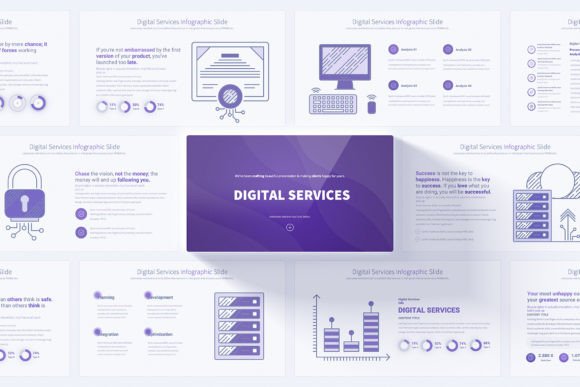
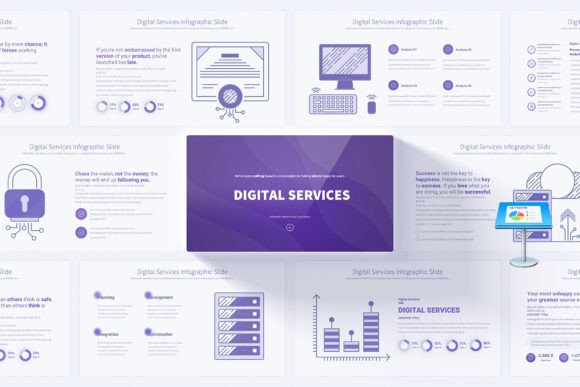
In a world saturated with uninspired slides and templated decks, standing out requires more than just data. It demands clarity, visual storytelling, and professional polish that resonates. The Digital Services Keynote Infographics template isn't merely a collection of slides; it’s a structured design system built for the modern presenter. Its core appeal lies in its dual nature: a meticulously crafted set of handmade digital services infographics housed within a framework engineered for effortless customization. This combination offers a distinct personality: clean, professional, and dynamically engaging, without the cold rigidity of many corporate templates.
The visual style is purposefully built on a clean, light background with twelve distinct color variations. This provides a versatile canvas that can be adapted to fit your brand’s palette while maintaining a sense of airy, uncluttered professionalism. Each slide features animated elements and smooth transitions, which are subtle tools for pacing and focus, not mere decoration. They guide the audience’s attention, making complex workflows or service architectures understandable and memorable.
The Strategic Applications for Creative Professionals
This template’s utility spans far beyond a single meeting. Its design assets are crafted to serve multiple contexts and audiences. For business professionals and IT consultants, it transforms dense technical processes into clear, step-by-step visual narratives. The infographics simplify concepts like cloud migration, cybersecurity frameworks, or digital transformation roadmaps, making them accessible to both technical and non-technical stakeholders.
Digital marketers and content creators can leverage its structure for campaign presentations, content strategy workshops, or analytics reports. The slides provide a cohesive visual language to present marketing funnel stages, SEO strategy pillars, or social media engagement metrics with impact. The included 280 fully editable vector icons act as a quick visual vocabulary to enhance any point.
For entrepreneurs and small business owners pitching services or seeking growth, the template offers a ready-made professional aesthetic. Using it for investor presentations, service overviews, or strategic planning sessions instantly elevates the perceived credibility of your digital offerings. The professional opening and closing slides frame your content with a confident, polished bookend.
Building Visual Hierarchy and Professional Consistency
A presentation’s effectiveness hinges on visual hierarchy and brand consistency. The Digital Services Keynote Infographics template, being based on Master Slides, is a powerful tool for enforcing both. The Master Slide foundation means global changes—to fonts, color themes, or logo placement—apply across all 204 total slides instantly. This is not just a convenience; it’s a safeguard for brand perception.
Consistency across every slide reinforces professionalism and aids in audience engagement. When viewers aren’t distracted by shifting styles or mismatched colors, they can focus on your message. The template’s built-in infographics establish a predictable visual rhythm, making complex information easier to digest. This consistent modern typography and layout approach helps your content feel like a unified story, not a disjointed collection of points.
A Practical Guide to Implementation and Customization
Adopting a new template requires a thoughtful approach to ensure it serves your specific needs. First, evaluate the project fit. Does your presentation content align with the digital services theme? While the infographics are specifically crafted for that domain, the underlying structure—with its clean layouts and customizable elements—is adaptable for many business topics.
Next, dive into the customization. The promise of “easily editable elements” is realized through the Master Slide system. Start by applying one of the twelve color variations to match your brand identity. Then, on the Master Slides, set your preferred font pairing. A good rule is to use a clean sans serif font for body text and a slightly more distinct sans serif or a serif font for headlines to create hierarchy. The provided PDF documentation will guide this process.
Testing is crucial. After making your global changes, review several of the 17 unique slides to see how your choices render. Pay attention to readability in different infographic layouts—ensure text size remains legible against icons and shapes. Then, leverage the bonus icon pack to replace or augment graphics as needed. Remember, the 204 slides include variations of each core slide; don’t feel you need to use every one. Curate the deck to your narrative’s length and flow.
From Template to Tailored Presentation Story
Consider a realistic example: a digital marketing agency presenting a proposed annual strategy to a client. They might use the template’s roadmap infographic to visualize quarterly milestones, the process flow slides to detail content creation pipelines, and the comparative analysis slides to show competitor benchmarks. By importing their own data into the editable charts and swapping in a few client-branded colors, the agency creates a presentation that feels bespoke, not generic. This seamless tailoring is the template’s real-world value.
For commercial licensing, this template is clearly intended for professional and commercial use across presentations, workshops, and planning sessions. Its design supports your own brand identity work, allowing you to integrate your logos, colors, and messaging without the constraint of a locked-down design.
Ultimately, the Digital Services Keynote Infographics template is a premium design asset that bridges the gap between high-end visual design and practical usability. It provides the scaffolding for a professional presentation, freeing you from the mechanics of slide construction so you can focus on the substance of your message. By offering both a strong visual starting point and total editorial control, it becomes an invaluable resource for any professional who needs to communicate digital concepts with clarity, confidence, and impact.