Communicating Cybersecurity: How Professional Infographics Clarify Complex Threats
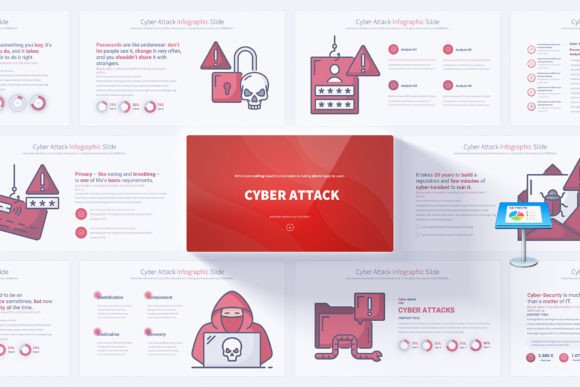
In our interconnected digital world, the topic of cybersecurity is no longer confined to IT department meetings. Discussions about data breaches, ransomware, and phishing attacks now happen in boardrooms, classrooms, and even at home. The challenge for anyone tasked with explaining these risks—whether a corporate leader, a consultant, or an educator—is making highly technical, often alarming information clear, structured, and actionable for a diverse audience. This is where specialized presentation tools, like a comprehensive Cyber Attack PowerPoint Infographics template, become not just a design asset, but a critical communication bridge.
Why Visual Communication is Essential for Cybersecurity Topics
Cybersecurity concepts are inherently complex. They involve abstract threats, intricate technical processes, and statistical data that can overwhelm listeners. Text-heavy slides filled with jargon quickly disengage an audience, leaving the core message—often about urgent preventative action—lost. Visual communication, particularly through infographics, transforms this complexity. It uses shapes, icons, colors, and diagrams to represent relationships, processes, and hierarchies visually.
For example, explaining the stages of a ransomware attack—from initial network infiltration to data encryption and the ransom demand—with a simple timeline infographic makes the sequence instantly understandable. Showing the most common attack vectors as proportional icons instantly conveys which threats are most prevalent. This visual decoding is vital. It shifts the audience's cognitive load from struggling to interpret dense text to effortlessly absorbing patterns and priorities, enabling them to follow the narrative of threat and defense you are building.
From Anxiety to Understanding: Simplifying Threat Landscapes
A common misunderstanding about cybersecurity presentations is that they should aim to scare the audience into compliance. While urgency is important, fear without clarity leads to paralysis or dismissal. Effective communication aims to empower. Handmade cybersecurity infographics, designed to simplify complex ideas, serve this exact purpose. A well-designed slide can break down a multifaceted concept like a “phishing campaign” into a clear flowchart: the malicious email creation, the targeting criteria, the deceptive content, the user action (clicking), and the resulting data compromise.
This demystification is crucial for all stakeholders. Employees learn exactly what to look for in their inboxes. Executives see the operational impact beyond just technical risk. Investors understand the potential financial liabilities. By translating technical reports into visual stories, the presenter moves the conversation from “This is scary” to “This is how it works, and here is how we defend against it.”
The Anatomy of an Effective Cybersecurity Presentation Template
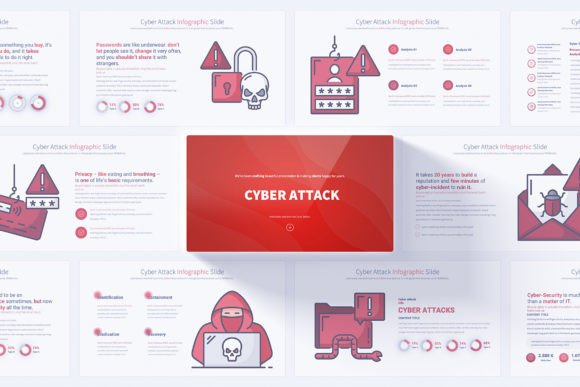
A powerful presentation on cyber threats requires more than a few scattered charts. It needs a cohesive structure built for storytelling and persuasion. A dedicated template, such as one offering 17 unique cyber attack slides with 204 total variations, provides this architectural foundation. Let’s explore the key features that make such a tool indispensable.
Building a Narrative with Opening, Closing, and Core Content Slides
Every impactful presentation has a narrative arc. Professional opening slides set the stage, establishing the importance of cybersecurity in the context of the audience's world—their business, their industry, their personal data. The core content slides, each focusing on a specific threat or strategy, form the body of the argument. Here, features like 12 color variations on a clean, light background ensure visual consistency without dark, oppressive tones that might distract from the message.
Finally, strong closing slides are not merely a “thank you.” They are for summarizing actionable security strategies, outlining next steps, and reinforcing the key message of vigilance and preparedness. This complete narrative journey, supported by a consistent visual theme, guides the audience from awareness to understanding to commitment.
Engagement Through Motion: Animations and Smooth Transitions
Static slides can fail to depict the dynamic, evolving nature of cyber attacks. Animated elements and smooth transitions serve a specific educational purpose. A simple animation can show a hacker icon “moving” through a network diagram, illustrating penetration. A transition can reveal layers of a defense strategy piece by piece, building the concept progressively. This controlled motion keeps the audience engaged and helps simulate processes that are, in reality, active and sequential, making the threat scenario more tangible and memorable.
Adaptability for Every Audience and Scenario
The true test of a presentation resource is its flexibility. Cyber threats need to be discussed with different emphasis to a technical team, a non-technical board, university students, or potential investors. A template with easily editable elements and simple customization via Slide Master allows one core deck to be efficiently adapted for each scenario. The consultant can emphasize business continuity plans. The educator can focus on foundational concepts and history. The corporate leader can highlight organizational policy and employee training. Having 204 total slides means there are ample pre-designed visuals for almost every sub-topic, saving countless hours of design work while maintaining a polished, professional look.
Beyond Slides: The Supporting Elements for Clarity
The value of a comprehensive template extends beyond the slide deck itself. Included resources like a bonus set of 280 fully editable vector icons are a library of visual vocabulary. Instead of searching for or creating icons to represent malware, firewalls, data encryption, or secure servers, the presenter has a consistent, professional set ready to use or modify. This ensures that every visual metaphor on every slide is clear and coherent.
Similarly, PDF documentation included with the template acts as a user guide and a cheat sheet for best practices in cybersecurity communication. It can help the presenter understand not just how to change a color, but why certain infographic layouts are effective for certain types of data. This support turns the template from a static product into an educational tool for the presenter themselves, enhancing their own ability to explain the subject matter.
Practical Relevance in Modern Business and Education
In practical terms, leveraging a tool like this fits directly into modern operational and educational needs. For businesses, a clear, compelling cybersecurity presentation can be the catalyst for approving a necessary security budget, launching a mandatory training program, or uniting different departments around a common security protocol. It turns IT risk assessments into business strategy discussions.
In education, such templates allow instructors to create engaging, up-to-date lectures on digital citizenship and information security. Students confronted with clean, well-designed infographics are more likely to absorb and retain critical knowledge about protecting their digital identities. In both realms, the presentation is the medium that translates expert knowledge into communal understanding and action.
Implementing the Template: A Guide for First-Time Users
If you are new to using a specialized infographic template, the process is designed to be user-friendly. Start by exploring the Slide Master view in PowerPoint. This is where you can see the underlying design structure—the layout placeholders for titles, content, and icons—and make universal changes like font styles or background accents. This ensures your customization is consistent across all 204 slides.
Next, browse the 17 unique slide concepts. Identify the ones that map to your key points: perhaps an “Attack Statistics” slide for data, a “Threat Timeline” for process explanation, and a “Security Layers” slide for defense strategies. Use the pre-made handmade infographics on these slides as they are, or tailor them using the editable elements. Replace text in the provided placeholders with your specific data and insights. The 16:9 Full HD resolution ensures your final presentation will look sharp on modern projectors and screens, maintaining professionalism.
Remember, your goal is not to use every slide, but to curate the sequence that best tells your specific story. The abundance of options means you have the flexibility to be concise and focused, without limiting your ability to cover a topic in depth.
Clarifying Common Assumptions
A final note is to address two common assumptions. First, that such templates are only for design experts. With features focused on easy editing and clear documentation, they are built for subject matter experts who are presentation novices. Your expertise is in cybersecurity; the template's expertise is in visual communication. Together, they create an effective presentation.
Second, that a “cyber attack” presentation is only about negative threats. In fact, a robust deck should also visualize defense, response plans, and security frameworks. It should balance the portrayal of risk with the pathway to resilience. This balanced view is what ultimately empowers an audience, leaving them not with fear, but with a clear visual map of the challenges and the solutions.
In conclusion, as cyber threats evolve and permeate every aspect of modern life, the ability to communicate them effectively becomes a key skill. A dedicated Cyber Attack PowerPoint Infographics template is more than a collection of slides; it is a structured, visual language for discussing vulnerability, strategy, and protection. By transforming complex data into clear, engaging, and adaptable visuals, it enables leaders, educators, and advisors to build a shared understanding—a critical first line of defense in our collective digital security.