The Real Power of SEO Analysis PowerPoint Infographics
Presenting SEO data is a unique challenge. You're tasked with translating complex metrics, competitive landscapes, and strategic roadmaps into a narrative that not only informs but also inspires action and secures buy-in. Many professionals default to dense spreadsheets or static, text-heavy slides that fail to engage. This is where a specialized tool like SEO Analysis PowerPoint Infographics becomes not just a template, but a strategic asset.
Beyond Pretty Slides: The Core Value of Visual SEO Reporting
The primary interest in a well-crafted SEO infographics template isn't merely aesthetic. It’s about efficiency and clarity. A slide deck designed specifically for SEO reporting allows you to standardize your communication, turning monthly reports or strategy presentations into a consistent, professional process. The real value lies in transforming raw data—like keyword rankings, traffic trends, or competitor gaps—into intuitive visuals that stakeholders can grasp instantly, without needing to decipher complex analytics jargon.
A Common Oversight: Confusing Volume with Versatility
A frequent mistake when evaluating such templates is focusing solely on the total number of slides. A package offering "204 total slides" sounds impressive, but the critical detail is the foundation: the 17 unique master slides. The best approach is to prioritize the quality and applicability of these core designs. Do they cover the essential facets of SEO analysis? Look for slides dedicated to SWOT analysis, funnel visualization, keyword clustering, competitor matrixes, and timeline-based project roadmaps. The hundreds of variations should serve to adapt these core concepts to different contexts, not simply repeat them.
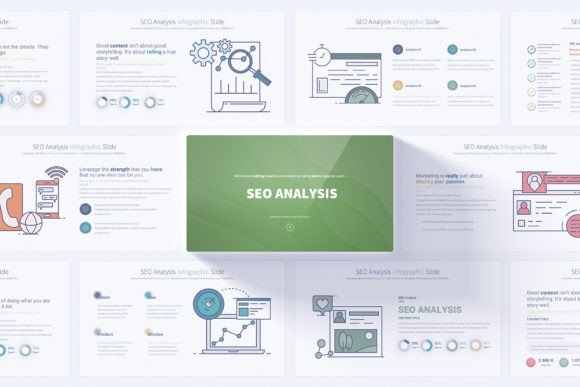
Neglecting this distinction leads to a cluttered, repetitive presentation library. You spend more time searching for a slightly different slide than actually customizing content. The practical advice is to scrutinize the list of unique slides first. Ensure they map directly to your reporting needs. The SEO Analysis PowerPoint Infographics template, with its handmade infographics for specific SEO concepts, addresses this by providing a logical starting point for every major part of your analysis.
The Hidden Pitfalls in Customization and Compatibility
Another area where professionals stumble relates to the mechanics of editing. The promise of "fully customizable" slides can be misleading if the underlying structure is cumbersome.
Assuming All Customization is Simple
A major misunderstanding is that easily editable elements automatically mean a quick design overhaul. Without a Slide Master foundation, changing core colors or fonts across a 100-slide deck becomes a manual, error-prone nightmare. The solution-focused feature of this particular template is its design around the Slide Master. This means you can change the primary color scheme or font family in one place—likely utilizing the 12 color variations provided—and it cascades throughout all slides, maintaining visual coherence and saving hours of work.
Furthermore, compatibility is often overlooked. A template in 16:9 Full HD resolution ensures it displays correctly on modern projectors and screens, but you must also confirm the format. A PPTX file ensures it works with current PowerPoint versions, but always verify it doesn’t rely on outdated fonts or effects that may not render on a colleague’s machine. The included PDF documentation is a sign of a professional product, often providing guidance on using the Slide Master and icons effectively.
Strategic Errors in Application and Audience Alignment
Even with a perfect template, its impact can be diluted by misapplication.
Using Infographics as a Crutch, Not a Catalyst
A common error is to populate the beautiful slides with superficial data. For example, using a sophisticated competitor comparison matrix slide but only filling it with generic, unactionable observations like "they have more social followers." This affects the presentation's credibility. The better approach is to use the template’s structure to drive deeper insight. The matrix should highlight specific gaps—like competitor ranking for a key commercial keyword you're missing—paired with your proposed tactical response. The template facilitates this; your strategic thinking must fulfill it.
Also, consider your audience internally. These decks are not only for client meetings. Using SEO Analysis PowerPoint Infographics for internal team briefings or to secure budget from management can be equally powerful. The professional opening and closing slides help frame the presentation as a serious business discussion, not just a technical report. Tailor the content density: for executives, focus on high-level trends and ROI projections; for your team, dive into the actionable task lists and performance benchmarks.
Evaluating the Full Toolkit: Beyond the Slides
Before deciding on any template, a holistic evaluation of the accompanying resources is crucial. What many overlook are the supplementary assets that extend the template’s utility.
The mention of "280 fully editable vector icons" is significant. A cohesive set of icons allows you to maintain visual consistency across all your company presentations, branding your communications. Similarly, the handmade infographics should be distinct from generic clip-art; they should feel tailored to marketing and SEO concepts, like representing search engine algorithms, website crawl health, or link-building ecosystems.
Ask yourself: Does this package provide a system or just slides? A system includes a coherent visual language (icons, color schemes, infographic style), ease of global editing (Slide Master), and clear guidance (documentation). This ensures the template is a long-term investment, adaptable for future campaigns and different types of projects, from digital marketing audits to business growth solution pitches.
The Final Check: Aligning Tool with Process
Ultimately, your decision should be guided by your process. If your SEO reporting is ad-hoc and stressful each month, a structured template can bring order and save valuable time. If your presentations currently fail to visually engage and persuade, a professional infographic set can elevate your authority. Check that the template covers your entire narrative arc—from problem statement (current performance gaps) to data presentation (traffic, rankings) to solution roadmap (action plan with timelines).
By avoiding the mistakes of prioritizing slide count over slide substance, neglecting the Slide Master’s power, and underutilizing the visual tools for strategic storytelling, you can leverage a resource like SEO Analysis PowerPoint Infographics to its full potential. It becomes more than a download; it becomes a framework for clearer communication, more effective strategy sessions, and ultimately, better SEO outcomes driven by aligned understanding and decisive action.